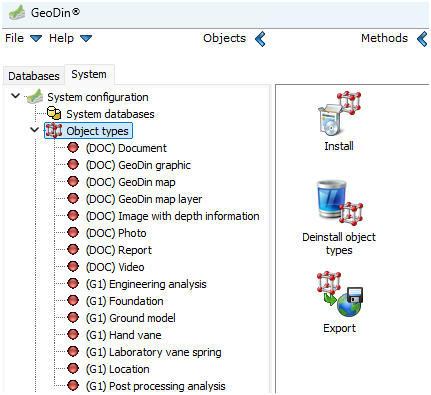
Object Types

GeoDin uses object types to represent various standards for recording drilling data or general geodata. An object type includes:

  • A predefined set of input forms

  • Dictionaries for standardized terminology

  • Fill patterns and symbols

These components are tailored to meet relevant standards and configured for specific use cases.

Overview of available Object Types

Object type
Multilingual
Layer data
EPSG
Samples
Well design
Data sequences
Meta data
Customisable
Fugro

Standard

BS 5930

x

x

x

x

x

EN ISO 22475

x

x

x

x

x

x

KAS

x

x

x

x

x

SEP 1

x

x

x

x

x

SEP 3

x

x

x

x

x

Environment

Contaminated site investigation

x

x

x

x

x

Climate measurement station

x

Geotechnical

UGS

x

x

x

x

GTS

x

x

x

x

x

AGS

Water

Well

x

x

x

x

x

Groundwater Well gallery

x

x

x

x

x

x

Waterworks

x

x

x

x

Documents

Document

x

GeoDIN graphic

x

GeoDIN map

x

GeoDIN map layer

x

Photo

x

Report

x

Image with depth information

x

Features

In GeoDin, the acquisition of drilling data or general geodata is always linked to an object type. The object type determines:

  • Which input forms and dictionaries are available

  • The fill patterns and symbols used for visualization

  • The structure of associated tables in your GeoDin databases

Each object type is configured for specific purposes and based on recognized standards such as EN ISO 22475, ISO 14688/14689, or BS 5930:1999.

Handling Object Types

  • GeoDin includes predefined object types by default.

  • Additional object types can be installed via the System tab.

  • Installed object types can be updated or removed in the application.

  • Files for each object type are stored in the Syslib directory.

  • Properties (version, dictionaries, input forms, symbols) are visible under System.

  • Dictionaries can be customized or extended for most object types.

Choosing an Object Type

  • Object types cannot usually be converted - Please note to choose carefully before data acquisition.

  • Explore demo databases to check suitability.

  • Discuss the choice with clients before starting.

  • For corrections or change requests to existing object types, or to discuss a custom object type, please contact GeoDin Client Success at [email protected]

Last updated

Was this helpful?