> For the complete documentation index, see [llms.txt](https://docs.geodin.com/llms.txt). Markdown versions of documentation pages are available by appending `.md` to page URLs; this page is available as [Markdown](https://docs.geodin.com/geodin-onsite/configuration/form-defaults.md).
# Form defaults
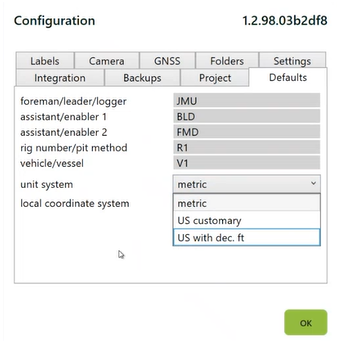
The **Defaults** tab in Configuration sets values that automatically populate every new form you create in the current project. This saves repeated data entry, reduces errors, and keeps values consistent across a project's forms.
## What you can default
| Field | Description |
| ----------------------------- | --------------------------------------------------------------------------------------------------------------------------------------- |
| **Foreman / Leader / Logger** | Name of the person supervising or logging the drilling. |
| **Assistant / Enabler 1 & 2** | Names of assistants involved in the drilling process. |
| **Rig Number / Pit Method** | Identifier for the drilling rig or pit method used. |
| **Vehicle / Vessel** | Name or ID of the vehicle or vessel associated with the project. |
| **Unit System** | Choose from **Metric**, **US Customary**, or **US with Decimal Feet**. |
| **Local Coordinate System** | EPSG code for your project's coordinate reference system. See [GPS & coordinates](/geodin-onsite/configuration/gps-and-coordinates.md). |
{% hint style="info" %}
**Tip:** Setting these defaults ensures that new forms are pre-filled with standard values, reducing manual input and minimising errors.
{% endhint %}
## Defaults apply to new forms only
Changing a default does not retroactively update forms you've already created - the change only affects forms created from that point forward. If you need to update existing forms, you'll have to edit them individually.
## When to use defaults
* **Multi-day projects** - set the drilling crew names once instead of typing them on every form.
* **Single-rig projects** - default the rig identifier and override manually for the occasional exception.
* **Consistent units** - set the unit system once so no form is logged in the wrong units by accident.
## Related settings
Some Onsite-wide settings live outside the Defaults tab but complement it:
* **Label printer** - set in [Label printing](/geodin-onsite/configuration/label-printing.md), applies across projects
* **Camera source** - set in [Camera](/geodin-onsite/configuration/camera.md), applies across projects
* **GPS source** - set in [GPS & coordinates](/geodin-onsite/configuration/gps-and-coordinates.md), applies across projects
* **UI language** - set in Configuration > Language & UI
***
**See also**
* [Project setup](/geodin-onsite/configuration/project-setup.md) - the project metadata these defaults live under
* [GPS & coordinates](/geodin-onsite/configuration/gps-and-coordinates.md) - GPS source and coordinate system
---
# Agent Instructions
This documentation is published with GitBook. GitBook is the documentation platform designed so that both humans and AI agents can read, navigate, and reason over technical content effectively. Learn more at gitbook.com.
## Querying This Documentation
If you need additional information that is not directly available in this page, you can query the documentation dynamically by asking a question.
Perform an HTTP GET request on the current page URL with the `ask` query parameter, and the optional `goal` query parameter:
```
GET https://docs.geodin.com/geodin-onsite/configuration/form-defaults.md?ask=&goal=
```
`ask` is the immediate question: it should be specific, self-contained, and written in natural language.
`goal` is optional and describes the broader end goal you are ultimately trying to accomplish on behalf of the user. GitBook uses it to tailor the answer towards what is most useful for that goal.
The response will contain a direct answer to the question and relevant excerpts and sources from the documentation.
Use this mechanism when the answer is not explicitly present in the current page, you need clarification or additional context, or you want to retrieve related documentation sections.